AI workbench for client data onboarding. Built for implementation teams at vertical SaaS.
Book WalkthroughNewsletter
Get the latest updates on product features and implementation best practices.
AI workbench for client data onboarding. Built for implementation teams at vertical SaaS.
Book WalkthroughNewsletter
Get the latest updates on product features and implementation best practices.
For implementation and data migration teams, the bottleneck isn't the software. It is the data. You have a static destination template for your CRM, ERP, or proprietary platform, and your clients send you data in inconsistent formats spanning numerous legacy vendors.
One client sends a CSV with Mobile Phone. Another sends an Excel file with Contact_Cell. A third sends a JSON dump nested three levels deep. Manually mapping these fields, cleaning the data, and writing custom Python scripts for every client is unscalable. It turns high-value implementation experts into data janitors, a framing first popularized by Steve Lohr's 2014 reporting in the New York Times, where data scientists were estimated to spend 50 to 80 percent of their time on collection and preparation rather than analysis.
The numbers haven't moved much in a decade. An IDC InfoBrief found that data workers waste 44 percent of their workday on unsuccessful activities and spend roughly 33 percent (around 12.5 hours per week) on data preparation. Tom Redman's Harvard Business Review analysis describes the same dynamic from the receiving side: knowledge workers waste about half their time in "hidden data factories," hunting for data, finding and correcting errors, and reconciling sources they don't trust.
We built Async AI Agents for Data Onboarding to remove this work, not to make humans faster at it. If you are still mapping the full landscape, our definitive guide to data onboarding covers the process, maturity model, and tooling end to end.
DataFlowMapper is the only tool with automated end-to-end data transformation and onboarding that owns the full loop from source file to validated output.
Other tools stop at smart suggestions or one-to-one column matching. Our Agents take ownership of the entire process. They write the transformation logic, run it against your validation rules, classify their own failures, rewrite the failing code, enrich the data with reference tables, and produce a final confidence-scored review for human approval before the file is delivered.
The core architectural choice is to shift focus from the source to the destination.
Instead of building a new mapping for every client file, you create a single Instruction Profile that describes your destination. The Profile contains:
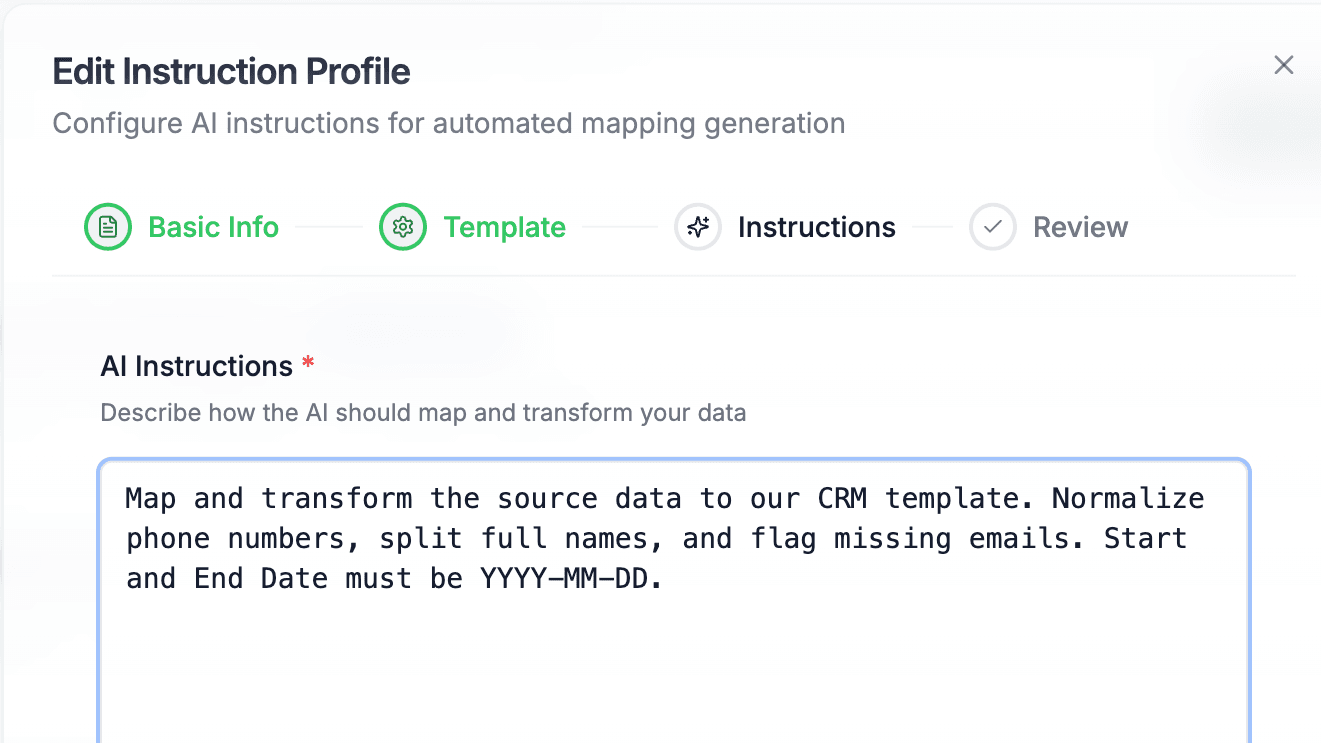
Once the Profile is set, it becomes a universal receiver. Upload any client file against the Profile and the Agent handles the translation. The same Profile accepts a CSV from one client, an Excel workbook from the next, and a JSON export from a third, without per-client mapping work.
Most "AI mapping" tools take a single best guess and leave the rest to you. If the logic is wrong, the import fails and you debug it manually.
DataFlowMapper's pipeline is structured as a five-role agentic system that mirrors the patterns documented in published agent research, then adds two production refinements not present in the papers. The pattern itself is the orchestrator-workers + evaluator-optimizer architecture Anthropic describes in its reference guide for production agents.
The Orchestrator agent receives the destination schema, field definitions, validation rules, source headers, source statistics, a sample of the source data (with optional PII masking for teams that enable it), and any reference tables attached to the job. It categorizes every destination field into one of three buckets:
For every transformation field, the Orchestrator writes a one-sentence business_goal and an optional global_hint. These are the agent's intent, and they get preserved across the entire job.
The Orchestrator's plan fans out to per-field Workers. Workers run in parallel, capped at 10 concurrent calls per job (a rate-limit guardrail), each one writing the transformation logic for a single field. Each Worker has access to the source sample, source stats, the field's business_goal, the optional global_hint, any matching gold-copy reference from a pinned template, and tool calls for inspecting source data, validating function syntax, and querying reference tables.
Workers return Python code, a confidence score, and a plain-English explanation. The orchestrator-workers split is the same architectural pattern Anthropic recommends for "tasks where the subtasks aren't pre-defined" and benefit from a planner that decomposes work and worker LLMs that execute decomposed pieces.
The pipeline assembles the worker outputs into a complete mapping file and runs the actual transform service against a sample window of the source data. The output and any failures get fed back into the next agent.
When the transform produces errors, a batch root-cause analyzer reads the per-field error context (sample failing rows, source stats, transformed stats, the generated logic) and classifies each error as one of two outcomes:
This data-versus-logic split is the first of two extensions beyond the published research. Self-Debug (Chen et al., ICLR 2024) demonstrates the underlying capability: an LLM can identify its own mistakes by executing code and reading error messages, then iteratively rewrite. The published version, however, retries every failure. The production refinement we added is the explicit BAD_DATA terminator: bad-data fields are excluded from subsequent iterations entirely. Without that classifier, the loop wastes budget retrying logic against inputs that no logic could rescue.
When the loop refines, only the BAD_LOGIC fields go back to the Workers. The Orchestrator does not re-run, and the original business_goal and global_hint for each field are preserved. The Worker receives them again, plus an error_context string explaining what failed and why, and writes a corrected version.
This is the second production refinement. Re-running the Orchestrator on every iteration would re-litigate decisions that don't need to change (which source field a destination maps to, what the field's business intent is) and would let earlier-pass success drift on the next pass. Preserving the plan and re-running only the implementation matches what experienced engineers do when debugging: keep the design, fix the function.
The hard failure mode in agentic data work is the row that runs cleanly but produces semantically wrong output. A LocalLookup that returns an empty string for every row because the join key was misspelled. A conditional that defaults to "Active" for every record because the Worker overfit to a sample where every row was active. A regex that strips the wrong characters because the sample didn't include the variation. None of these throw errors. All of them ship corrupt data downstream.
The Sentinel agent reads the requirements, the destination schema, the transformed output statistics, and a sample of the actual transformed rows. It looks for cleanly-running fields whose output values are inconsistent with the documented intent and writes them back into the error context as if they were errors, so the refinement loop treats them the same way.
This pattern follows the verbal-self-reflection mechanism in Reflexion (Shinn et al., NeurIPS 2023), where an agent inspects its own output for semantic correctness rather than relying solely on hard execution signals. In the DataFlowMapper pipeline, the Sentinel runs both during the loop (when the analyzer says all errors are BAD_DATA, giving Sentinel a "second opinion" chance to reclassify) and on the final full-dataset output, before the Reviewer produces the user-facing confidence score.
Loop control is explicit and bounded. Each Profile sets max_attempts (default a small integer). When the loop hits the max with errors still present, the system grants exactly one additional attempt and no more. After that the loop terminates, and the run is sent to the Reviewer with the best-converged mapping. This implements the bounded-autonomy pattern Anthropic describes, where useful agent operation requires explicit retry limits and human checkpoints to avoid runaway cost or quality drift.
After the final transform runs on the full dataset, the Reviewer agent reads the requirements, the destination schema, the assembled mappings, the error context, and the transformed-output statistics. It produces:
The Reviewer is what separates a confident production system from an agent demo. The score gets written to the job, the flags surface in the UI, and the user reviews them before signing off on the import.
The refinement loop runs against a sample window (default 1,000 rows) for the same reason production engineering does: cost control and turnaround time. But sample success is not production success.
When the loop converges, the pipeline runs one final transform with row_limit=None against the full source file. Errors and statistics are then re-analyzed end-to-end (Phase 3b in the codebase), and Sentinel runs once more on the full-dataset output. The confidence score and flags the user reviews are calculated from this final run, not from the sample window the loop iterated on.
This matters when source data has long tails. A sample of 1,000 rows can run cleanly while row 47,000 fails because it's the only record with a particular edge case. By re-analyzing on the full file, the Reviewer reflects what the user would see in production, not what the loop optimized against.
Real-world data migration is rarely just moving Column A to Column B. Most onboards require enrichment: looking up region codes, joining customer reference data, normalizing product hierarchies against your master records.
With Async Agents, you upload Reference Tables (a 20,000-row customer contact dump, a country code list, an internal product taxonomy) at job start. The Orchestrator detects the available tables, the Workers receive the table schemas as part of their context, and the generated transformation code calls LocalLookup functions directly. No VLOOKUP, no SQL join, no manual Python merge.
Forrester's data fabric guidance calls this exact capability "automated code generation for integration, dynamic entity resolution, and automated data mapping and linking across silos." That is what the Worker is doing every time it writes a LocalLookup against a reference table you supplied.
Onboarding cycles are not fast at scale. McKinsey's analysis of corporate client onboarding puts the average end-to-end process at up to 100 days, with KYC due diligence and account setup alone consuming more than 40 percent of that timeline. For SaaS implementation teams, the file-mapping work that gates a go-live is the equivalent constraint: data prep is the rate limiter.
McKinsey's generative-AI productivity research estimates 30 to 45 percent productivity gains in customer-facing operations from automation that handles the work end-to-end (not copilots that make a human marginally faster at the same task). That delta is what an agentic loop produces: complex onboards that used to take hours of analyst back-and-forth complete in minutes while the analyst works on judgment-heavy tasks like reviewing the Reviewer's flags.
For teams currently absorbing the cost of manual mapping in their P&L (recurring analyst capacity, engineering hours on format changes, deferred revenue from slipped go-lives, all dynamics laid out in our data migration cost analysis), this is what removes the constraint.
Full automation does not mean losing control. When the Agent finishes its loop, it generates a comprehensive QA Summary that is the human checkpoint, not a log file dump.
The QA Summary surfaces:
You also receive the standard DataFlowMapper mapping file. Open it in the visual Logic Builder to inspect every rule, edit anything you want changed, and sign off before the final delivery.
This human-in-the-loop checkpoint is not optional architectural decoration. The Harvard Business Review Analytic Services / Workato survey (December 2025) of 603 business and technology leaders found that only 6 percent of companies fully trust AI agents to autonomously run their core business processes. The QA Summary is the bridge that lets the other 94 percent ship agentic onboarding into production responsibly.
Honesty helps both of us. Agents are not the right answer for every onboarding problem. Four cases where a different tool or approach is the better call:
Your source format is fully controlled and never varies. If every file comes from an upstream system you own and the schema is locked, build a static, deterministic mapping once and run it. The agent loop has nothing to optimize against and adds cost without upside. A reusable CSV data mapping template is the right pick.
Most of your failures will be bad data, not bad logic. The BAD_DATA classifier terminates the loop correctly when it detects unfixable inputs, but it cannot rescue what isn't there. If your inbound data quality is consistently poor (required fields blank, schemas violated, encoding broken), the upstream fix is data governance, not a smarter agent downstream. Gartner predicts that more than 40 percent of agentic AI projects will be canceled by the end of 2027, with input quality and unclear business value cited as the primary causes. Run a quality assessment before deploying agents on a problem they can't actually solve.
Your destination schema isn't stable yet. The Instruction Profile is the destination definition the agent optimizes against. If the destination is still being designed, the Agent will faithfully implement the wrong target. Stabilize the schema first, then layer agentic onboarding on top.
Zero-touch loads into a regulated downstream system. Even at high confidence, the QA Summary review step is a feature, not a friction. The Remote Labor Index benchmark (arXiv 2510.26787) found that today's best-performing AI agents achieve only a 2.5 percent automation rate on real freelance projects without human oversight, which is the honest ceiling on full hands-off operation across general work. For regulated loads (insurance, healthcare, financial services), human sign-off on the Reviewer's flags is what makes the deployment defensible.
In any of those cases, the cleaner pattern is a deterministic mapping the team owns and runs, configured once and re-used, instead of an agent re-deriving the same logic on every run.
Stop writing one-off scripts for every new client. Build your Instruction Profiles once, attach reference tables for enrichment, and let the Async Agent loop handle the mechanical work, classify its own failures, fix what it can, surface what it can't, and hand you a confidence-scored output for review.
For a deeper look at the AI mapping layer that powers individual Worker decisions, see how DataFlowMapper's AI data mapping tools work. For real customer outcomes from teams running this workflow in production, see the data onboarding case study.
 DataFlowMapper
Ready to eliminate onboarding headaches & secure your spot?
DataFlowMapper is the only platform with fully autonomous AI Agents for end-to-end data mapping and customer onboarding. Other tools in the space stop at column-matching suggestions a human still has to act on. DataFlowMapper's Async AI Agents implement an orchestrator-workers architecture that writes the transformation logic, runs it against full validation, classifies failures as bad data versus bad logic, self-corrects the bad-logic cases, and surfaces a final confidence score and flags for human review before delivery. The pipeline pattern follows published agent research: Anthropic's evaluator-optimizer loop, Reflexion-style verbal self-reflection (NeurIPS 2023), and Self-Debug execution-based correction (ICLR 2024).
Each job runs through a five-role agentic pipeline: an Orchestrator categorizes destination fields and writes the business goal for each one, parallel Workers generate the transformation code (up to 10 concurrent), the transform executes against the data, a root-cause analyzer classifies any errors as bad data or bad logic, a Sentinel inspects the cleanly-running fields for silent failures, and a Reviewer produces a final confidence score on the full-dataset output. Bad-logic fields are re-run by Workers with the original intent preserved. The loop is bounded by max_attempts plus one hail-mary extension, so the system never thrashes.
Yes. You create a single destination Instruction Profile, and the Agent autonomously maps diverse source formats (CSV, Excel, JSON) to that profile. The Profile is the universal receiver. The Agent is source-agnostic and infers the right transformation from sample data, source statistics, and the destination schema.
Three architectural details that aren't in published agent papers. First, the loop classifies every error as either BAD_DATA (the source value cannot produce a valid output) or BAD_LOGIC (the generated code is wrong). Bad-data fields are excluded from the next iteration so the agent doesn't retry against unsolvable inputs. Second, the loop preserves the Orchestrator's original intent across retries, so refinement only injects error context, not a full re-plan. Third, the refinement loop runs on a sample window (cost control), but the final transform runs on the full dataset and is re-analyzed end-to-end. The confidence score the user reviews reflects production output, not a sample success.
Agents can use uploaded reference tables (customer lists, region codes, product hierarchies) as lookup sources. The Agent detects available reference tables at job start and writes LocalLookup function calls into the transformation logic where appropriate, joining datasets and normalizing values without anyone writing a VLOOKUP, an SQL join, or a Python merge. This implements the automated entity resolution and cross-silo data linking that Forrester identifies as a core gen-AI use case in data fabrics.
Four cases. First, when the source schema is fully controlled and never varies, a static mapping is simpler and a deterministic CSV data mapping tool is the right pick. Second, when most failures will be bad data rather than bad logic, the loop terminates correctly but cannot fix unfixable inputs. Third, when the destination schema isn't stable yet, the Instruction Profile has nothing to optimize against. Fourth, for zero-touch loads into regulated downstream systems where human sign-off is mandatory regardless of confidence score, the QA Summary is the bridge, not a bypass. The Harvard Business Review Analytic Services / Workato survey (Dec 2025) found only 6 percent of companies fully trust agents to run core processes autonomously, which is the realistic ceiling on full hands-off operation today.