AI workbench for client data onboarding. Built for implementation teams at vertical SaaS.
Book WalkthroughNewsletter
Get the latest updates on product features and implementation best practices.
AI workbench for client data onboarding. Built for implementation teams at vertical SaaS.
Book WalkthroughNewsletter
Get the latest updates on product features and implementation best practices.
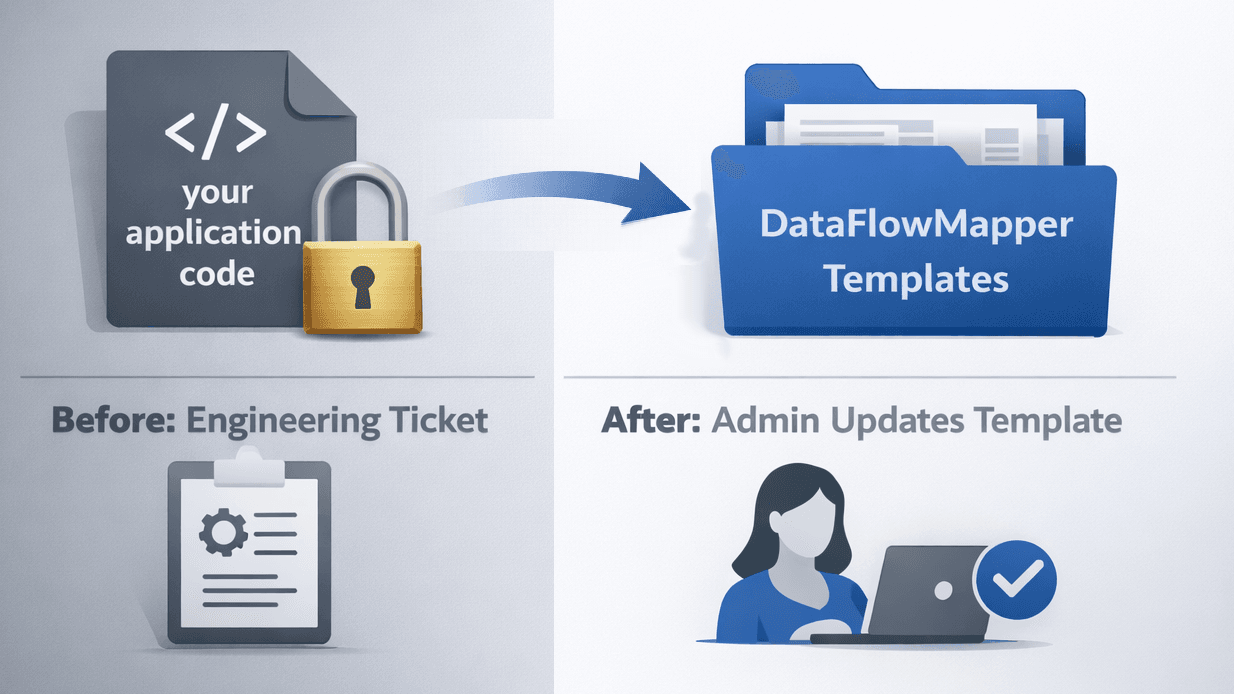
You embedded OneSchema, or you're evaluating it. The importer handles the upload. Clients see their columns, map them, fix validation errors, and submit. Then a client's file format changes, a new business rule needs to apply to incoming data, or a validation needs updating, and the change routes to an engineer.
That's what most OneSchema alternative searches are about. The driving concern is where transformation logic lives after the importer is embedded, and who owns it when something changes.
For a broader view, the data transformation tools comparison shows how embedded importers stack up against spreadsheets, custom scripts, and enterprise ETL.
CTOs, VPs of Engineering, and PMs at SaaS companies whose clients upload files as part of onboarding or recurring operations: if format changes from clients currently route to your engineering team, this comparison is relevant. If your clients upload data once with simple column mapping requirements and minimal transformation logic, OneSchema may be exactly right and this post is not for you.
OneSchema is a competent embedded importer. It's worth being specific about what that means before explaining where the limits appear.
CustID to Customer_ID, dob to Date of Birth. Reduces client friction on the initial column mapping step for standard fields.Where the architecture creates problems:
Transformation logic stays in your codebase. OneSchema's importer handles column renaming and prebuilt validation at the UI layer. Anything more complex (conditional field transformations, calculated values, business rules specific to your data model, reference data lookups) requires coded event handlers or post-processing in your application. The importer provides a clean upload surface; your backend handles the transformation logic. That dependency doesn't go away when you embed the widget.
Schema changes require engineering. When a client's file format changes, someone has to update the transformation handlers in your application and ship the change. OneSchema's blueprints define the expected schema, not the transformation logic. Format changes route back to your development team regardless of what changed on the upload side.
Every import is a fresh session. A client sending a monthly file maps their columns each time, or you maintain schema configurations that require dev work when anything drifts. There is no template model where a full transformation runs automatically on every subsequent upload from that client without remapping.
Reference data joins happen in your backend. OneSchema doesn't support lookup tables or reference data during transformation. If the transformation requires matching against a reference table (product codes, client IDs, security masters), that logic lives in your application after the file is submitted.
This reflects a deliberate design choice. OneSchema is built to be a clean client-facing upload experience with strong prebuilt validation tooling, which is the right fit for one-time onboarding with standard validation requirements. For recurring imports with business logic or transformation rules that change, the architectural fit breaks down.
The question that separates tools in this category is who owns the transformation logic after embed and what happens when it needs to change.
With OneSchema's embedded importer, the answer is: your engineering team owns it, and a change requires a code update and a deploy.
This creates two concrete problems:
Problem 1: A client's file format changes. A column gets renamed. A new required field appears. A date format shifts. OneSchema's mapping UI might handle the visual remapping step for the client, but the transformation code in your application still has to be updated and deployed. The importer moves that maintenance work slightly downstream rather than eliminating it.
Problem 2: Recurring operational imports. A client sends the same file format every month. In OneSchema's model, that client maps their columns every session, or you maintain schemas that break when anything drifts. There is no mechanism where an admin defines the full transformation once and it runs automatically on every subsequent upload without client interaction or developer involvement.
For one-time onboarding with simple column mapping, the maintenance burden is manageable. For recurring imports with business rules, the compounding cost of keeping transformation logic in your codebase (updating handlers, managing schema drift, routing format changes to engineering) is the reason teams start looking for a OneSchema alternative.
OneSchema has a second product called FileFeeds AI. It handles complex data pipelines through conversational AI: mappings, joins, PDF extraction, and transformations, with files arriving via SFTP, S3, email, or API.
It's worth addressing directly because it looks like it solves the transformation problem. For this specific use case, it doesn't, and here's why.
FileFeeds AI is a pipeline tool for internal data operations teams. It's designed for your team to build and manage internal data workflows, not for embedding into your SaaS product so that your clients can upload files. The two products have different architectures, different buyers, and different use cases.
The embedded importer is what your clients interact with. FileFeeds AI is what your internal team uses to build pipelines. They don't overlap.
If you're evaluating a OneSchema alternative because clients upload files and the resulting transformation logic lives in your codebase, FileFeeds AI doesn't change that equation. The embedded importer still has the same architectural limitations regardless of what OneSchema's internal pipeline product can do.
| Capability | OneSchema | Flatfile / Dromo | DataFlowMapper |
|---|---|---|---|
| Transformation logic location | Your application code | Your application code | Versioned templates in DataFlowMapper |
| Schema or logic change after embed | Code change + deploy | Code change + deploy | Template update. No deploy, no ticket. |
| Recurring import logic reuse | Client remaps each session or brittle schema | Client remaps each session or brittle schema | Template runs automatically. No remapping. |
| Reference data / joins during transform | Not supported natively | Not supported natively | Lookup tables in template; clients upload reference files |
| Complex transformation logic without code | Requires custom code | Requires custom code | Visual Logic Builder + Python IDE, no code required for most cases |
| Validation rule updates | Developer + deploy | Developer + deploy | Admin updates template. No deploy. |
| Prebuilt validation library | 50+ types, one-click autofixes | Basic; complex rules require code | Any business rule expressible via visual logic builder |
| Pricing model | Not publicly listed. Contact sales. | Flatfile: opaque, ~$10K median. Dromo: $499/mo listed. | Published fixed tiers |
| Compliance certifications | SOC 2 T2, HIPAA, GDPR, CCPA | SOC 2 (Flatfile, Dromo) | SOC 2 compliance roadmap |
DataFlowMapper is the right choice for teams that want transformation logic owned by admins, not engineers, because the template model moves the entire transformation layer outside your application's codebase.
Rather than splitting transformation logic between an upload widget and application code, DataFlowMapper stores the complete transformation in a versioned template.
When a client uploads a file, the template runs automatically. The client sees their data, validation errors surfaced in a filterable grid, and a submit button. They don't interact with the mapping logic. It's fixed in the template. For recurring imports, every subsequent file from that client runs the same template with no remapping.
The dev dependency question: In a DataFlowMapper embedded configuration, every logic change (schema updates, new validation rules, updated business rules, new client formats) is handled by admins in DataFlowMapper. None of it requires a code change or a deploy. With OneSchema, Flatfile, and Dromo, all of those events route back to your engineering team.
Reference data joins are a first-class capability in DataFlowMapper templates. Most scenarios where teams hit the limits of first-generation importers involve reference data:
In OneSchema's architecture, this reference data lookup is your application's responsibility. DataFlowMapper's template approach handles it natively: admins configure which reference files the template accepts, clients upload those files alongside their main data, and during transformation the lookup table matches on key columns and returns reference values. No backend join logic, no separate pipeline step.
If you're evaluating this for your SaaS product, see how DataFlowMapper's embedded portal works →
The underlying question is whether you want to be in the business of maintaining transformation logic in your application code. OneSchema makes the upload step clean and the validation step fast. The ongoing maintenance cost of the transformation layer in your code is the same regardless of which first-generation importer you embed.
DataFlowMapper is the right choice for recurring imports with business logic, reference data joins, or transformation rules that non-developers need to own and update, because the template architecture is built for exactly that.
For a direct comparison with Flatfile, see Flatfile Alternatives for Recurring Imports and Complex Transformations.
 DataFlowMapper
DataFlowMapper's template model keeps all transformation logic in DataFlowMapper, managed by admins. Schema changes, new business rules, updated validations: template updates. No code change. No deploy. No ticket.
OneSchema handles column mapping and validation well at the UI layer. The limitation is where transformation logic lives. Anything beyond OneSchema's prebuilt validation library (conditional field transformations, calculated values, business rules, reference data lookups) requires coded event handlers or post-processing in your application. OneSchema doesn't eliminate this engineering dependency; it provides a clean upload surface with strong validation tooling while your backend handles the transformation logic. For teams with recurring client imports or business rules that change, format updates still route to your development team.
OneSchema's embedded importer supports 50+ prebuilt validation types and basic data cleaning. For complex transformation logic (conditional field assignments, multi-field calculations, business rules specific to your data model, reference data lookups), you need to write custom code in your application. OneSchema's newer FileFeeds AI product handles more complex pipelines via conversational AI, but it is a separate internal pipeline tool, not part of the embedded importer experience. In the embedded importer, complex transformations still require application-level code.
FileFeeds AI is a separate OneSchema product designed for internal data operations teams. It uses AI to build data pipelines from conversational instructions, handling mappings, joins, and transformations for files arriving via SFTP, S3, email, or API. It is not the same as OneSchema's embedded importer. The embedded importer is the client-facing upload widget you add to your SaaS product. FileFeeds AI is an internal pipeline builder for your own team. The two products have different buyers and different use cases. FileFeeds AI does not change the embedded importer's architectural limitations around transformation logic ownership.
OneSchema's embedded importer is built around a per-session model. A client uploads a file, maps columns in the UI, validates, and submits. For recurring imports (the same client sending a weekly or monthly file), they repeat the mapping step, or you maintain schema configurations that require dev work when anything changes. There is no template model where a full transformation including field mappings, business logic, validations, and lookup tables is defined once and runs automatically on every subsequent upload without client interaction or developer involvement.
No. OneSchema's pricing is not publicly listed. They offer Starter, Pro, and Enterprise tiers, but each requires contacting sales for a quote. There is no self-serve purchase option with transparent pricing on their site. This is the same model as Flatfile. If pricing transparency is a requirement for your evaluation, DataFlowMapper publishes fixed pricing tiers without requiring a sales conversation.
OneSchema and DataFlowMapper solve different layers of the same problem. OneSchema handles the upload step: clients see their data, map columns, fix validation errors, and submit. Transformation logic beyond those validations lives in your application code. DataFlowMapper moves the entire transformation layer into versioned templates managed by admins. After embedding DataFlowMapper, zero transformation logic lives in your application. Field mappings, business rules, validations, and reference data lookups are all defined in templates. Schema changes, new business rules, and updated validations are template updates made by admins. No code change, no deploy, no engineering ticket.
DataFlowMapper is built for exactly this. For most transformation use cases (field mapping, conditional logic, calculated fields, reference data lookups, data validation), no custom code is required. A visual logic builder with drag-and-drop variables, if/then blocks, and a function library handles the logic. For edge cases, a Monaco Python IDE is available, and the code can be parsed back to the visual UI for future editing. All logic lives in the template, not your application code, and never requires a code change or deploy to update.
OneSchema is a good fit when: clients upload data once at onboarding rather than on a recurring schedule; transformation requirements are minimal (column renaming and standard format validation); your team has engineering capacity to maintain transformation code as client formats change; OneSchema's prebuilt validation library covers your needs without custom logic; or HIPAA and GDPR compliance certifications are hard procurement requirements. If any of those conditions don't apply (recurring imports, business rules, reference data dependencies, or wanting transformation logic out of your codebase), a different architectural approach is warranted.