AI workbench for client data onboarding. Built for implementation teams at vertical SaaS.
Book WalkthroughNewsletter
Get the latest updates on product features and implementation best practices.
AI workbench for client data onboarding. Built for implementation teams at vertical SaaS.
Book WalkthroughNewsletter
Get the latest updates on product features and implementation best practices.
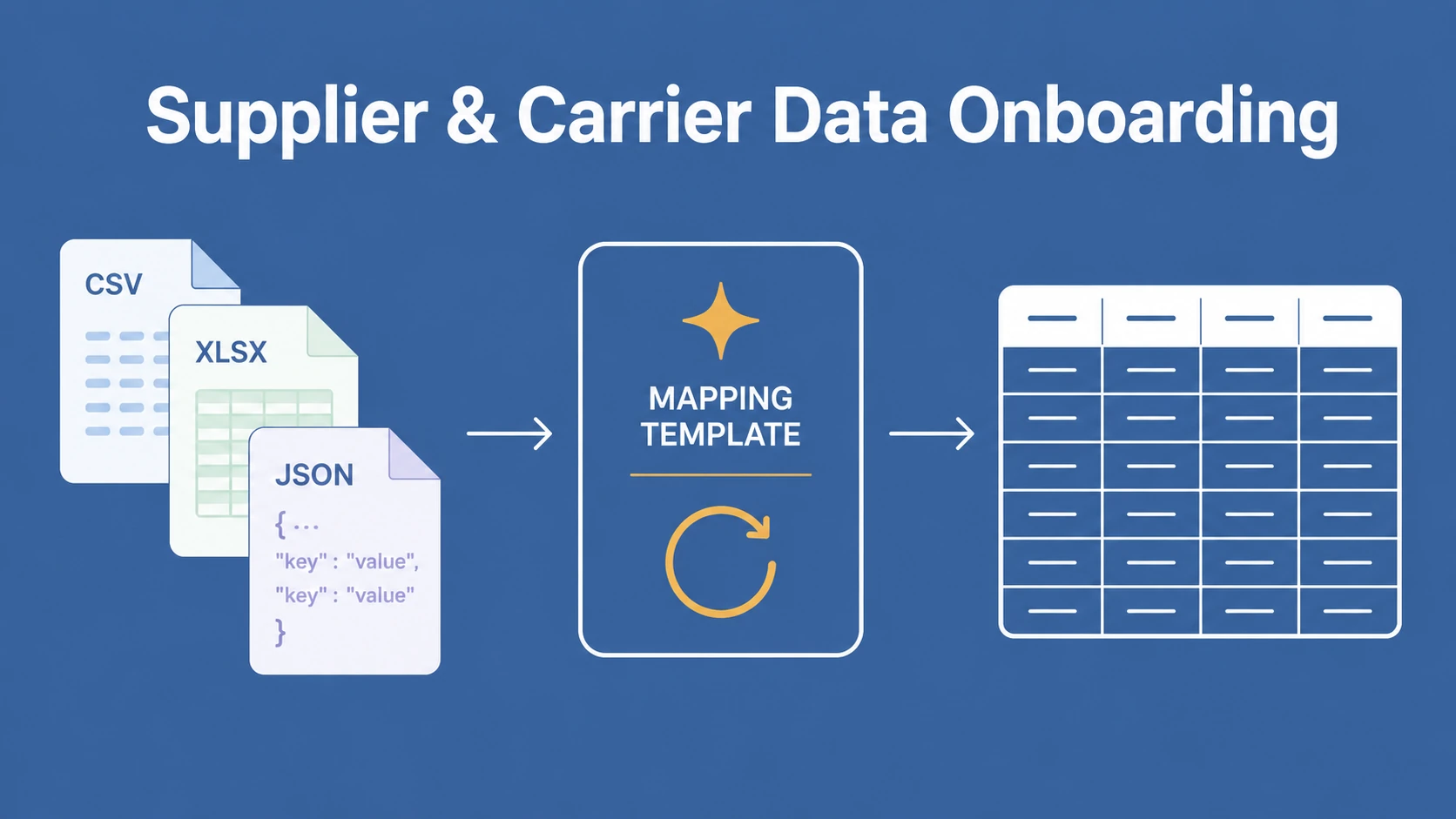
TL;DR: Supplier and carrier data onboarding is the work of turning each partner's file into your one canonical schema, and a reusable mapping template per format is what makes it repeatable.
- The problem: every supplier and carrier exports a different CSV, Excel, or JSON layout, so each file gets re-mapped by hand.
- The fix: build one reusable template per format. Every future file from that partner loads in minutes, with AI field matching and validation built in.
- Who it is for: procurement, B2B ecommerce platforms, logistics, and insurance teams that receive many partners' files into a single schema, rather than merchants importing their own catalog.
 DataFlowMapper
Bring a real supplier or carrier file and watch DataFlowMapper map it to your schema as a reusable template, with validation built in.
You have already onboarded the supplier. The contract is signed, the vendor record exists, the carrier is approved. Then the first file arrives, and it looks nothing like your system expects: a CSV with their column names, their date format, their product codes, their own idea of how a row should be shaped. Multiply that by every supplier and carrier you work with, and the bottleneck shifts from approving partners to turning the data they send into the data your system can use.
This is the daily reality for procurement and vendor operations teams, for the platform teams at B2B marketplaces and large retailers onboarding suppliers into a product catalog, and for logistics teams normalizing carrier files. The audience here is the team on the receiving end, taking many external partners' files into one schema, again and again, rather than a merchant importing a single catalog into someone else's store. Re-mapping each partner's data by hand, every time a file arrives, is the work that eats the time.
Search for supplier onboarding software and you will find a wall of supplier relationship management platforms: SAP Ariba, Coupa, Jaggaer, and a long tail of vendor risk and compliance tools. They do real work on the upstream side, vetting partners, running compliance checks, storing contracts, and maintaining the vendor master record. Then they hand you an approved supplier and assume the data that supplier sends is already clean, which it rarely is.
The approved supplier emails a spreadsheet of products with headers you have never seen. The new carrier sends shipment files in a layout built for a different broker. Every relationship tool ignores the one task that recurs forever: translating each partner's file format into your schema. That task is supplier and carrier data onboarding, and the vendor-management tools never touch it.
DataFlowMapper works alongside your SRM and procurement system. It takes over the moment a partner starts sending real data, and it serves the team that has to make that data fit, using reusable data mapping templates instead of a fresh spreadsheet per partner.
The root cause is mechanical, and the partners are not being difficult. Each supplier and carrier exports from a different source system, and each system produces whatever format is native to it. One sends Cust_ID, Prod_Code, QTY. The next sends Customer ID, SKU, Quantity. A third sends a nested JSON export from its ERP. A carrier sends shipment and cost files structured around its own operations.
The two standard responses both fail at scale:
So files keep arriving in dozens of shapes, and the variety itself becomes the work. Format variety at the partner end is the problem, and the only durable fix is to absorb that variety on your side instead of pushing it back onto partners. A spreadsheet rebuilt per partner cannot keep up, because it captures one format once and learns nothing for the next.
The expense hides in plain sight because it is spread across analysts and cycles rather than landing as one line item. Bad data is not cheap in aggregate: Gartner estimates poor data quality costs organizations an average of 12.9 million dollars a year, and Harvard Business Review put the broader US figure at 3 trillion dollars annually. The time cost is just as real. Practitioners still spend roughly 39 percent of their time on data loading and cleaning, more than on the analysis the data was collected for.
For a team onboarding partners, that shows up three ways:
Manual mapping has no memory, so the cost never goes down: the tenth supplier is as much work as the first. Reusable templates change exactly that.
Whether your team calls it a supplier data mapping tool or supplier data mapping software, the model is the same. You define one canonical destination schema, the structure your system needs. Then, for each incoming partner format, you build a mapping template once and reuse it forever.
DataFlowMapper turns each partner's file format into a reusable template your team owns, so the next file from that partner loads in minutes instead of being re-mapped by hand. The pieces that make that work:
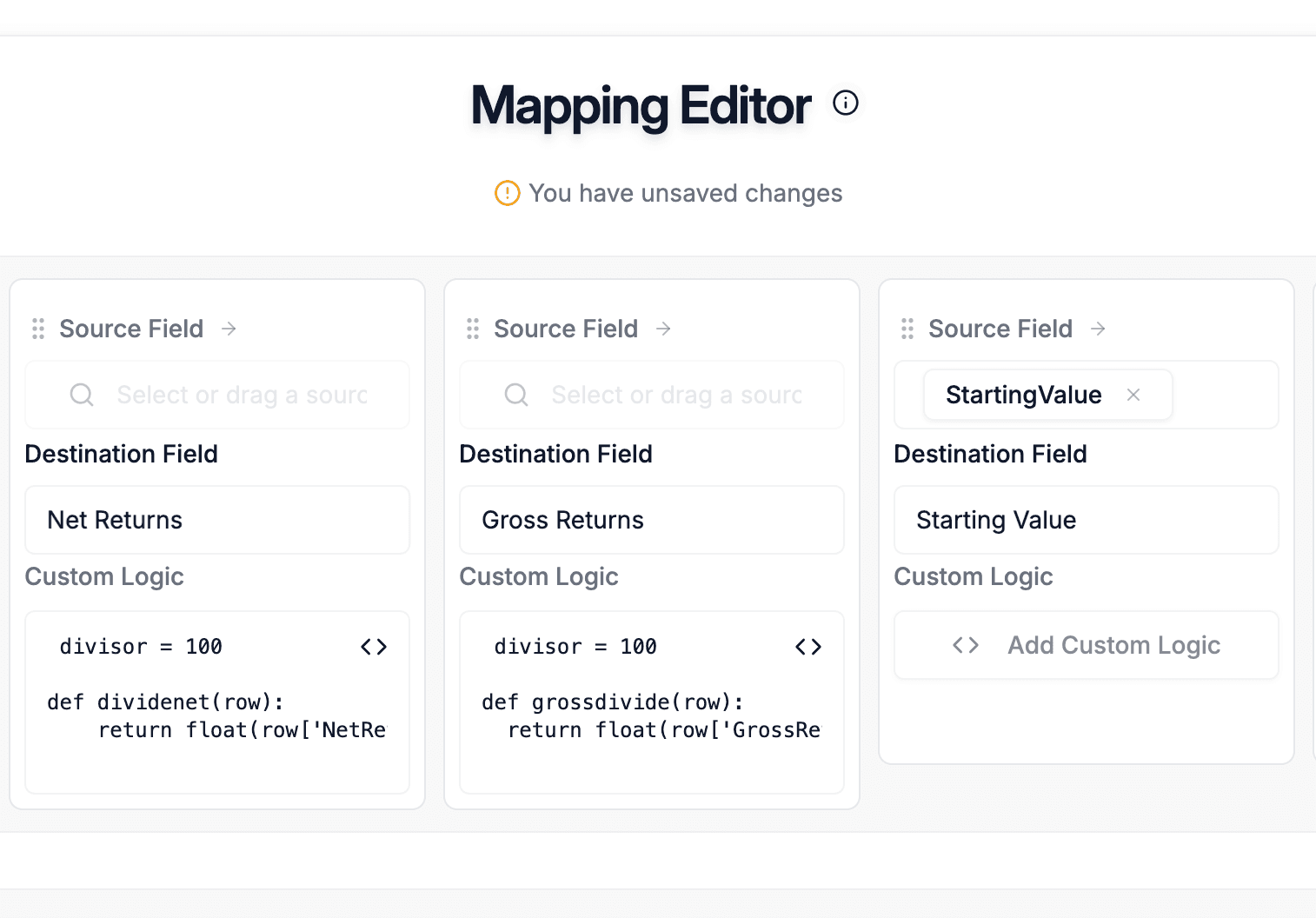 Fig: Map a partner's columns to your schema once, add logic and validations, and save the result as a reusable template.
The same reusable-template model fits several teams that all face many partners, many formats, and one schema.
Procurement and vendor operations. Teams managing dozens of suppliers receive master data, catalogs, and cost files in every layout imaginable. A template per supplier format turns each recurring upload into a quick run-validate-approve pass, and a format change into a one-time template edit rather than a new dev ticket.
B2B ecommerce platforms and large retailers. Platforms onboarding suppliers into a product catalog or fulfillment system receive product feeds as CSV, Excel, and JSON, often with mismatched identifiers, category schemes, and variant structures. Reusable templates normalize each supplier's feed into the catalog schema, with validation catching identifier and category errors before they break pricing or search. This is the receiving-platform job, distinct from a merchant managing a single store's own catalog.
Logistics and 3PL operators. Carrier onboarding means ingesting many carrier file formats that differ by carrier and by broker: shipment manifests with pickup and delivery details, rate files priced by lane, zone, or service tier, and freight invoices with line-item charges and accessorials. Larger carriers may exchange data over EDI, while most send CSV or Excel exports whose layout shifts whenever a broker updates its rules. A reusable template maps each carrier file export to one normalized schema, with validation rules that flag bad cost and reference values, and replaces the manual reconciliation that misses errors.
Insurance delegated authority. The same pattern drives insurance carrier and coverholder onboarding, where every MGA sends a different bordereaux layout on a monthly cycle. That vertical has its own deeper playbook in our guide to bordereaux processing, and the template-reuse principle is identical.
For teams onboarding partners at high volume, the mapping can also run as a batch job: see how AI agents for data onboarding generate and check an entire mapping across a schema in one pass.
| Capability | Manual spreadsheets | Custom scripts / ETL | Embedded importers (Flatfile, OneSchema) | DataFlowMapper |
|---|---|---|---|---|
| Reusable across partners | No, rebuilt each time | Yes, if maintained | Per session | Yes, one template per format |
| Transformation logic beyond renaming | Fragile formulas | Yes, in code | In your app code | Yes, visual, no code |
| Owned by non-developers | Yes | No | No | Yes |
| Handles format variety per partner | Manually | Per-format code | Limited | Yes, plus Adapt to File |
| Validation built in | Manual | Hand-coded | Basic rules | Yes, per-cell, reusable |
| Learns from past mappings | No | No | No | Yes, team knowledge base |
| Versioned and auditable | No | If disciplined | Limited | Yes |
Spreadsheets solve exactly one partner once, then break when the author leaves or the format shifts. Custom scripts are repeatable but turn every format change into an engineering ticket. Embedded importers give end users a clean upload experience but leave real transformation logic in your codebase. DataFlowMapper occupies the middle that the others leave open: reusable, no-code, owned by the team doing the onboarding, with the transformation and validation logic that importers push back to engineering.
Picture onboarding ten suppliers by hand. Supplier A sends a CSV, and an analyst builds a spreadsheet of lookups to map it to the internal schema, adds checks, and documents the mapping in a separate file. Supplier B sends the same data with different headers, so the analyst rebuilds the spreadsheet from scratch because the formulas point at the old columns. By supplier ten, the team has spent days on mechanical header-matching, and the first export change quietly breaks a spreadsheet that someone then has to debug.
With templates, the analyst builds one mapping for Supplier A, sets validation rules, and saves it. Supplier B arrives with different headers but the same underlying data, so the analyst runs Adapt to File, reviews the proposed matches, confirms, and saves a variant. By supplier ten the team has a few core templates plus a handful of variants, and each new partner either matches a template or becomes a short adaptation. When Supplier A changes format, the analyst updates the affected fields and saves a new version, with the history showing exactly what changed. You build each mapping once, and that is the difference.
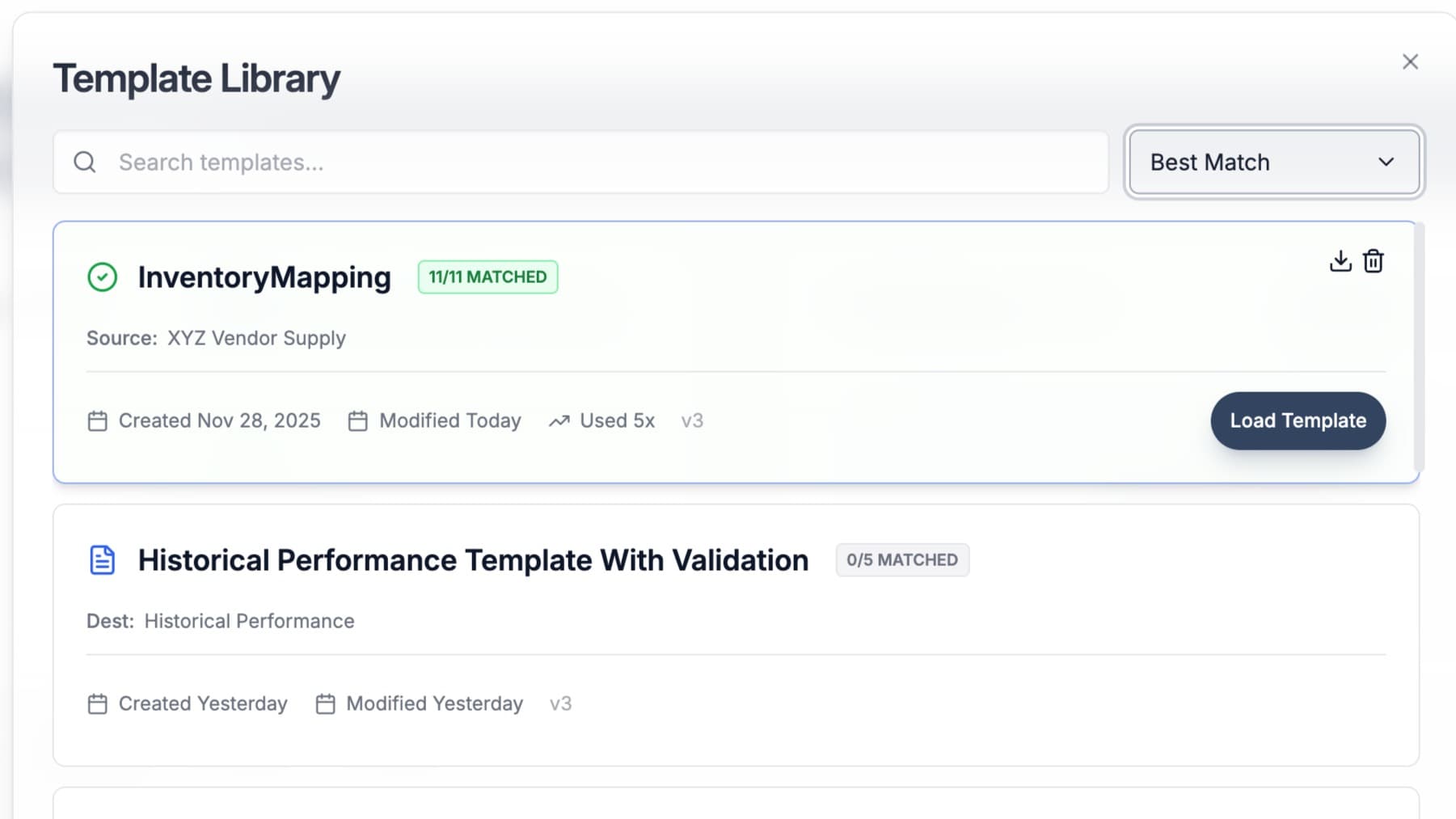 Fig: Saved templates become a team library, versioned and shared, so the next partner onboarding starts from prior work.
This approach pays off when the work recurs. DataFlowMapper fits well when you receive files from ten or more suppliers, carriers, or partners with format variety, when those formats repeat over time, when implementation or operations staff should own the mapping logic instead of engineering, and when you need validation and an audit trail on every file.
It is the wrong tool for a genuinely one-time migration with no reuse, for partners willing to adopt a full API or EDI integration (where DataFlowMapper is complementary, handling the partners who stay on files), or for data so unstructured that there is no recurring shape to template. Naming those cases honestly matters more than winning every reader.
For the teams it does fit, the math is simple: the recurring analyst time spent re-mapping partner files is usually the largest hidden cost, and a reusable template removes most of it. For the broader picture of where this sits in the onboarding lifecycle, see our guide to data onboarding.
DataFlowMapperBuild one reusable template per supplier or carrier format. The next file they send loads in minutes instead of a full rebuild.
You build a reusable mapping template once for each supplier or carrier file format, then reuse it for every future file in that format. In DataFlowMapper, you upload a sample of the partner's file, the AI proposes confidence-scored field matches to your destination schema, you confirm the ambiguous ones, and you add any transformation and validation logic in a visual builder. That saved template becomes the standing translation for that partner, so the next file they send loads against the template instead of being re-mapped by hand. When a new supplier sends a similar format, the Adapt to File feature proposes the existing template's mappings as a starting point, so onboarding the second and third partner is faster than the first. No code, and no rebuilding from a blank sheet each time.
A supplier data mapping tool, sometimes called supplier data mapping software, takes the files your suppliers and carriers send (CSV, Excel, JSON, each in its own structure) and translates them into the single schema your system expects. It matches each partner's columns to your fields, applies transformation rules such as combining fields, normalizing dates and units, and looking up reference values, validates the result, and outputs clean data ready to load. What separates a real tool from a spreadsheet is reuse: the mapping is saved and rerun for every future file from that partner, so you are not rebuilding lookups each cycle. DataFlowMapper is a supplier data mapping tool built for the team receiving the data, so implementation, operations, and data staff own the mappings directly.
Yes, and that reuse is the point. A template stores the field mappings, transformation logic, validation rules, and lookup tables for one partner's format in a single file. When another supplier or carrier sends data in a similar structure, you apply that template and adjust only the differences rather than starting over. DataFlowMapper's Adapt to File feature analyzes the new file, proposes how the existing template maps onto it, and preserves the transformation logic while updating field references. Over time a team builds a small library of core templates plus per-partner variants. The fiftieth onboarding draws on everything the team already mapped, which is why each one gets faster instead of repeating the same manual work.
The first time you onboard a supplier or carrier, you do the real work: match their columns to your schema, write the transformation and validation logic, and confirm the output. With a reusable template, that work is saved. Every subsequent file from that partner loads against the saved mapping in minutes. When the partner changes their export format, you update the affected fields in the template once rather than debugging a spreadsheet of formulas. When a new partner arrives with a similar format, you adapt an existing template instead of building from scratch. Recurring partner data stops being a recurring project, and the team's time shifts from mechanical re-mapping to reviewing the edge cases that actually need judgment.
Suppliers and carriers rarely agree on a format, and asking every partner to conform to your template usually fails because their source system exports whatever it natively produces. DataFlowMapper handles this by accepting each partner's format as it is (CSV with any delimiter and header position, Excel, or JSON, including nested JSON) and transforming it on your side into your canonical schema. You define one destination schema, then a mapping per incoming format. Reference lookups normalize codes and categories, validation rules catch bad values before they load, and the AI proposes the initial field matches for each new format. The work of standardizing stays inside your tool instead of being pushed onto partners who will not adopt your template anyway.
Errors creep in when partner data is rekeyed or reshaped by hand, and they usually surface downstream as pricing, fulfillment, or reporting problems. DataFlowMapper reduces this two ways. First, the mapping and transformation run the same way every time from a saved template, so a format that was validated once does not drift when a different person handles the next file. Second, you define validation rules in a visual builder (required fields, allowed values, format checks, cross-field logic) that run on every file and highlight failing cells in a filterable grid before anything loads. You fix the flagged rows, not the whole file. Because the rules live in the template, every future file from that partner is checked against the same standard automatically.
Supplier relationship management platforms such as SAP Ariba, Coupa, and Jaggaer handle the upstream side of bringing on a supplier: vetting, risk and compliance checks, contracts, and the vendor record. They assume that once a supplier is approved, the data flowing from that supplier is already clean and structured. Supplier data onboarding is the downstream problem they leave open: taking the actual files a supplier or carrier sends, in whatever format, and turning them into the structured data your systems need. DataFlowMapper sits in that gap and works alongside your SRM, handling the file-to-schema translation that begins after the supplier is approved and starts sending product, cost, shipment, or claims data in its own format.
Embedded importers like Flatfile and OneSchema are built to give your end users a clean upload-and-map experience inside your product, and they are good at column matching and basic validation. Transformation logic beyond renaming columns tends to live in your application code, so a new business rule or a partner format change still routes to engineering and a deploy. DataFlowMapper is built for the team receiving and normalizing many partners' files, with the transformation and validation logic held in reusable templates that implementation and operations staff edit directly. There is no per-format code change. For teams that do want to embed an importer in their own product, DataFlowMapper offers that as well, but the core difference is where the logic lives and who owns it.
Cost and pricing errors are some of the most expensive to catch late, so validation runs at ingestion. In DataFlowMapper you define validation rules that check the cost fields on every supplier or carrier file: confirm that required price and quantity fields are present, flag unit costs that fall outside an acceptable range, catch duplicate or missing line items, and cross-check that totals match the sum of line items. Because those rules are saved in the reusable template, every future file from that partner is checked against the same pricing standards automatically, and failing cells are highlighted in a filterable grid before anything loads. That catches mispriced or malformed cost data upfront rather than during reconciliation.